SDK vs Platform
- Updated:
The architecture behind Tecton extensions
If you haven't already, read our guide on Tecton extensions first to learn what extensions are and why they exist. Now we'll dive into how the two main Tecton packages, q2-tecton-sdk and q2-tecton-platform, work together to enable extensions to run inside a host platform.
SDK vs Platform: Understanding Tecton's Architecture
The Tecton framework operates on a client-server model where:
q2-tecton-sdkis the "client" - used by individual extensions to connect to and communicate with the platformq2-tecton-platformis the "server" - used by the host application that boots, manages, and provides functionality to extensions
This micro-frontend architecture enables extensions to run in isolation while communicating with the host platform through a well-defined API.
q2-tecton-sdk
The q2-tecton-sdk package provides the feature-level API that extensions use to connect to and communicate with the platform.
What Happens During Connection
When a feature calls connect(), the q2-tecton-sdk package performs several initialization tasks:
- Establishes Communication - Sets up a message bus to communicate with the
q2-tecton-platformpackage - Fetches Platform Capabilities - Queries what actions and sources the platform supports
- Loads Tecton Web Components - Initializes all design system components for use in the feature
- Applies Styling - Loads the Tecton theme, CSS utilities, and platform-specific styles
This means features get both the communication capabilities (actions/sources) and the visual components (web components and styling) they need, all from a single connect() call.
When to Use
Use q2-tecton-sdk when:
- Building a new feature/extension to run inside a Tecton platform
- Communicating with the host platform (navigation, modals, data requests)
- Accessing platform services (configuration, caching, authentication)
- Responding to platform events (language changes, theme changes, platform event messages)
- Using Tecton Design System components in your feature UI
Example Usage
Here is an example of using q2-tecton-sdk in a Vue.js application with Pinia for state management. We'll first import the connect function from the SDK package and use it to establish a connection to the platform. The platform capabilities supported by the platform are then made available to the feature for interaction and we will set them on our store for global access.
import { connect } from 'q2-tecton-sdk';
import { createApp } from 'vue';
import { createPinia } from 'pinia';
import { useGlobalStore } from '@/store';
import App from '@/App.vue';
import router from '@/router';

connect().then(capabilities => {
    const { actions, sources } = capabilities;
    const app = createApp(App);
    app.use(router);

    const pinia = createPinia();
    app.use(pinia);
    const store = useGlobalStore();

    // Set sources and actions on the store
    store.sources = sources;
    store.actions = actions;

    app.mount('#app');
});
q2-tecton-platform
The q2-tecton-platform package allows a parent application to host and manage Tecton-based extensions. The platform initializes Tecton by providing a compiled set of Tecton configuration objects for the features it will host and a platform adapter object that defines the Tecton capabilities the platform integrates and supports. The platform also exposes outlets for features and handles loading feature configuration into the correct outlets.
When to Use
Use q2-tecton-platform when:
- Building a host platform to run Tecton features (like UUX, Q2 Console, Q2 Config)
- Managing multiple micro-frontends and their lifecycle
- Providing platform services to features (navigation, APIs, caching)
- Routing messages between features and the platform
- Implementing platform-level capabilities (authentication, theming, analytics)
Example Usage
Here is an example of how the q2-tecton-platform package is used to initialize a platform. The init function is called with a platform adapter that provides the control functions for Tecton APIs that the platform supports and a Tecton configuration object that defines the features and their modules to be hosted by the platform. The initialization returns several functions that the platform can use to manage Tecton features and their configurations.
import { init } from 'q2-tecton-platform';

const platformAdapter = {
  // Control functions
  requestPlatformData: (url, method, data) => { /* ... */ },
  showModal: (options) => { /* ... */ },
  getFeatureConfig: (configVariables) => { /* ... */ },
  getCurrentLanguage: () => 'en-US',
  getCurrentTheme: () => 'default',
};

const tectonConfig = {
  features: {
    // Feature configurations
    CustomExtension1: {
        modules: { /* ... */ }
    },
    CustomExtension2: {
        modules: { /* ... */ }
    },
  }
};

const {
    tectonParamsChanged,
    updateConfig,
    verifyConfig,
    configLookup,
    teardown,
} = init(tectonConfig, platformAdapter);
For more on Tecton platforms and setting one up, see our walkthrough guide on Setting up a Platform.
Communication Flow
Now that we understand the roles of the Tecton SDK and Platform packages, let's look a basic communication flow between a feature and the platform:
- Platform initializes Tecton with
q2-tecton-platformand theinit()function and provides platform adapter - Features connect to Platform via
q2-tecton-sdkwithconnect() q2-tecton-sdksets up communication channel withq2-tecton-platformand receivesactionsandsourcessupported by platform adapterq2-tecton-sdkprovidesactionsandsourcesto feature for platform interaction- Features call
actionsorsourcesto request platform services q2-tecton-sdkcommunicates requests toq2-tecton-platformq2-tecton-platformexecutes requests via platform adapter control functions and responds toq2-tecton-sdkq2-tecton-sdkreceives responses and provides results/data to features
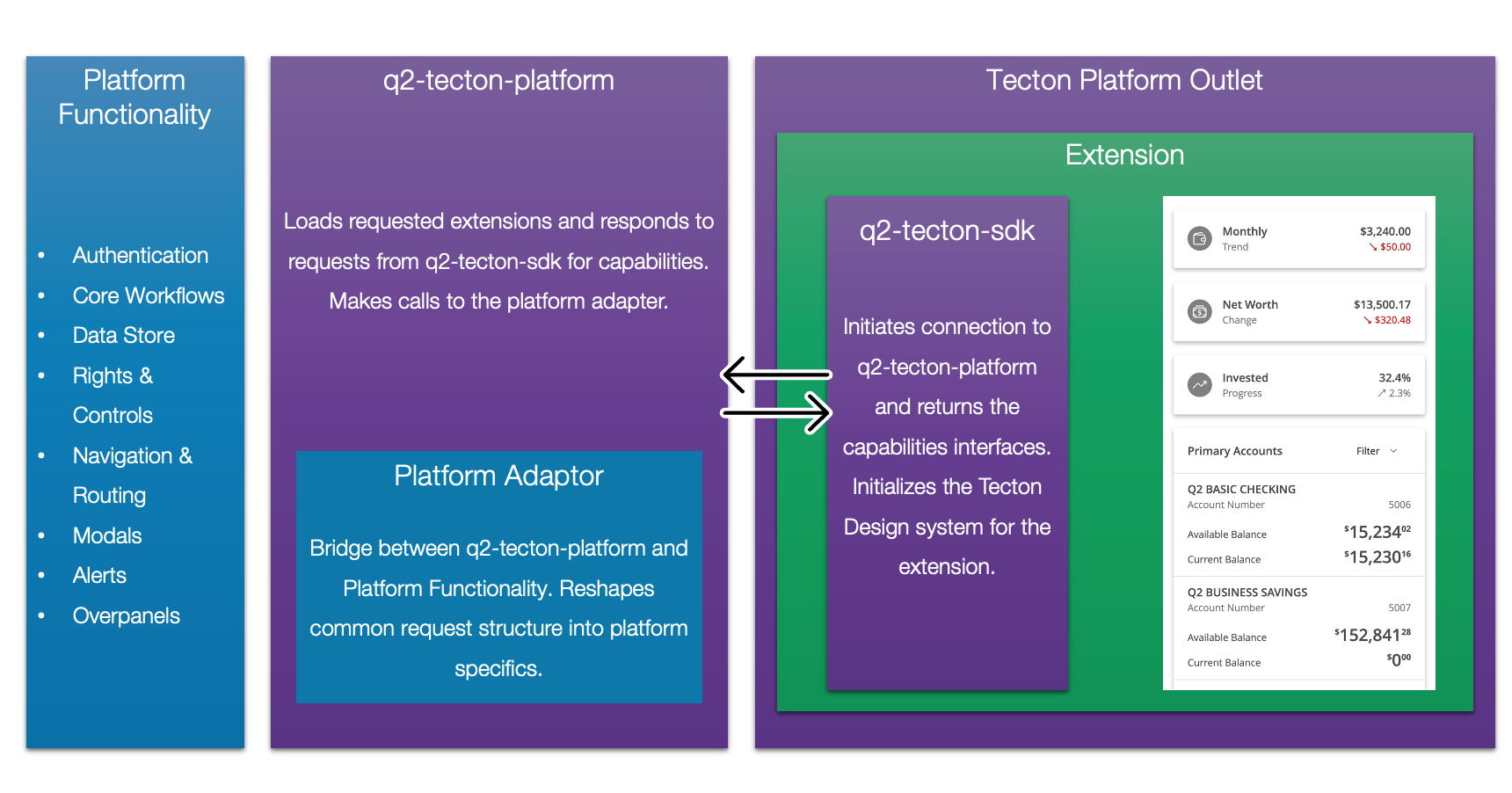
This architecture enables true isolation while providing a powerful communication layer between extensions and the platform.