UUX Content Controls
- Updated:
How to limit access to Tecton extensions based on account or transaction types.
As shown in this example below, the context filter for a Tecton module lives within the module's meta.type object.
{
  "core": false,
  "modules": {
    "Main": {
      "overpanel": false,
      "primary": true,
      "navigable": true,
      "url": "{BASE_URL}/index.html",
      "formPostAuth": false,
      "meta": {
        "type": {
          "context": "Account::LineOfCredit"
        }
      }
    }
  }
}
We can place different values in the context field for the type of account or transaction this extension should associate with. The value for this field is always as follows:
<ContextType>::<ContextSubType>
There are two context types that are currently possible for Tecton extensions in UUX:
AccountTransaction
Account Contexts
If you want your extension to appear for any account type, you will use the following:
"context": "Account::Q2Account"
Use any of the subtypes below to narrow the extension to show a subtype of account. In the above context, the Q2Account string would be replaced with a subtype from the list below (e.g. Account::Checking)
CheckingMoneyMarketSavingsCertificateOfDepositGoalPlanBasedInvestmentIRABasedInvestmentBrokerageBasedInvestmentLineOfCreditInstallmentCommercialMortgageHomeEquityMasterCardVisaDiscoverAmericanExpress
Transaction Contexts
If you want your extension to appear for any Transaction type, it looks like this:
"context": "Transaction::Q2Transaction"
Use any of the subtypes below to narrow the extension to show a subtype of transactions. In the above context, the Q2Transaction string would be replaced with a subtype from the list below (e.g. Transaction::GenericCredit)
GenericCreditInterestCreditDividendDepositATMCreditPOSCreditTransferCreditDirectDepositHoldCreditOtherCreditGenericDebitInterestDebitFeeServiceChargeATMDebitPOSDebitTransferDebitPaymentCheckCashDirectDebitRepeatPaymentOtherDebit
Additional Context Restrictions
When utilizing UUX content controls for account contexts, you are limited to a set of 16 known account contexts. This can be limiting at times as there can many more variations of account product types specific to a financial institution.
With Tecton 1.32, we introduced the concept of additional context. Platforms have the ability to pass along an additional-context value in addition to the primary context-value when implementing contextual tab and menu outlets.
UUX starts passing additional-context along with Account tabs and menu items starting in 4.5.2.0. This allows Tecton to introduce a new configuration for modules that works in conjunction with meta.type.context, additionalContextRequirements.
{
  "core": false,
  "modules": {
    "Main": {
      "overpanel": false,
      "primary": true,
      "navigable": true,
      "url": "{BASE_URL}/index.html",
      "formPostAuth": false,
      "meta": {
        "type": {
          "context": "Account::Savings"
        }
      },
      "additionalContextRequirements": ["26", "27"]
    }
  }
}
additionalContextRequirements are layered on top of current context requirements. additionalContextRequirements cannot be set without the default context in the meta.type also being set. When both are set, the validation must be met for both the context and the additional requirements in order for a module to be shown in a contextual outlet.
What does this mean in practice? Well, in UUX, contextual Account tabs and menu outlets pass along the Account product identifier as additional-context. This allows us to more granularly control access to your extension in these contextual outlets by defining a list of supported product IDs as additionalContextRequirements.
For example, if an module is setup with a context of Account::Checking the additionalContextRequirements can be setup with a set of Product IDs that fall the Checking context. Your module will now only be available when those product IDs are passed as additional context instead of being available in all Checking account tabs and menus.
We know these additional context values are not always known at the time of development and can vary by environment, so if you would like assistance getting these restrictions setup for your module, open a ticket through the developer portal and we will be happy to assist.
Context Hierarchy
The context types listed above are organized into a hierarchy. When an outlet resolves which extensions to display, it matches the current context against the hierarchy — a module configured for a broader context (like Account::Q2Account) will match all account subtypes, while a module configured for a specific context (like Account::Checking) will only match that subtype.
Account Hierarchy
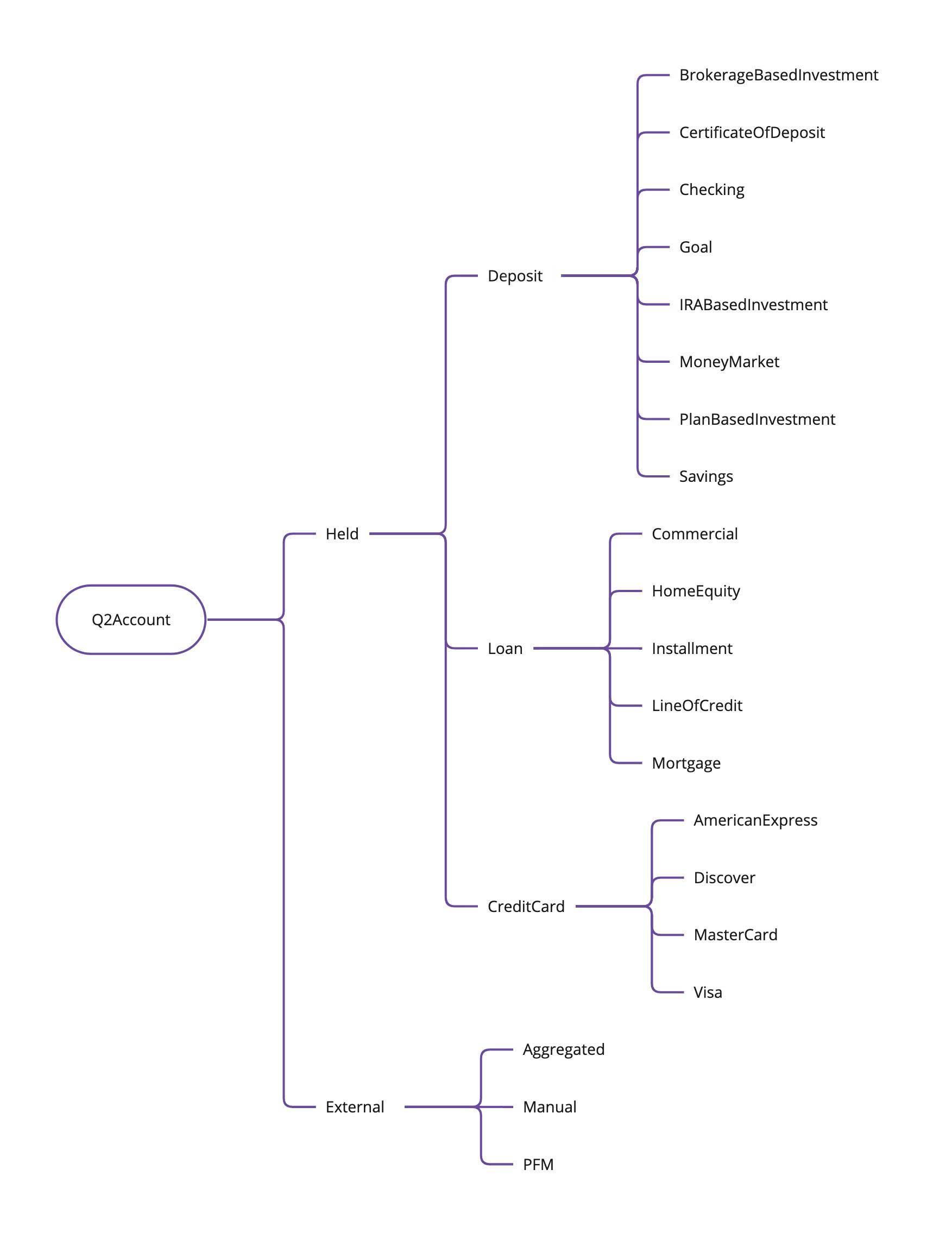
Click image to expand
Transaction Hierarchy
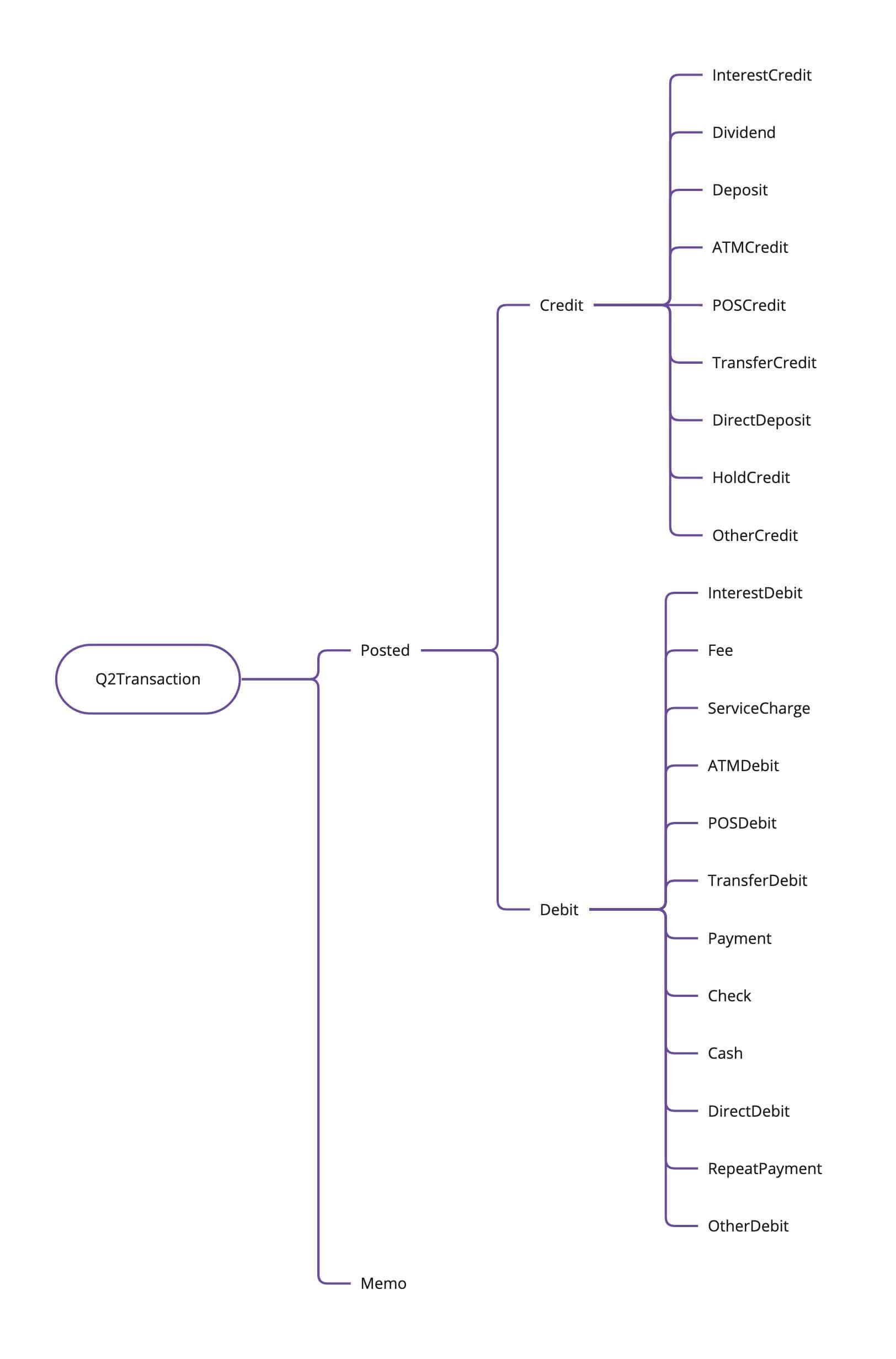
Click image to expand
This hierarchy is used by Tecton's context resolution system to determine if a module's configured context is compatible with the current outlet context. A module configured for Account::Held will appear for all held account types (Deposit, Loan, CreditCard and their subtypes), while a module configured for Account::Checking will only appear for Checking accounts.